In the rapidly evolving landscape of DevOps and backend engineering, the demand for sophisticated orchestration tools has never been higher. n8n has emerged as a game-changer, bridging the gap between low-code ease and high-code flexibility. Unlike traditional automation platforms, n8n allows developers to build complex workflows, integrate distinct APIs, and, most notably, deploy a powerful n8n AI agent to handle cognitive tasks autonomously.
For software engineers tired of maintaining brittle cron jobs or “spaghetti code” scripts, n8n offers a visual, node-based architecture that supports JavaScript and Python execution out of the box. Whether you are looking for a seamless n8n download for self-hosting or prefer the managed scalability of n8n cloud, this platform provides the infrastructure needed to modernize your stack. This comprehensive guide explores why n8n is superior to competitors, how its AI capabilities are revolutionizing the industry, and how you can start automating today.
What is n8n? Redefining Workflow Automation
At its core, n8n (nodemation) is a source-available workflow automation tool that enables you to connect anything to everything. Unlike closed-ecosystem tools like Zapier, n8n.io champions a “fair-code” model. This approach resonates deeply with the developer community because it offers the freedom to self-host, audit the code, and extend functionality without hitting arbitrary paywalls.
The platform operates on a node-based system. Each node performs a specific action—triggering a webhook, transforming JSON data, or querying a database. When connected, these nodes form an n8n workflow.
Key Differentiators for Developers:
- Code Execution: Native support for running JavaScript and Python within nodes for complex data manipulation.
- Self-Hosting: Complete control over your data privacy and infrastructure via Docker or npm.
- Debugging: Granular execution data allows you to inspect the JSON output of every single node step-by-step.
The Rise of the n8n AI Agent
The most significant advancement in the recent versions is the introduction of n8n AI capabilities. As Large Language Models (LLMs) reshape software engineering, n8n has positioned itself as the orchestration layer for AI.
An n8n AI agent is not just a chatbot; it is a semi-autonomous workflow capable of reasoning. By utilizing LangChain integrations directly within the canvas, developers can create agents that:
- Perceive: Read emails, scrape websites, or query SQL databases.
- Think: Use models like GPT-4 or Claude via API to process information.
- Act: Execute tasks based on the AI’s decision, such as updating a CRM or deploying code.
Use Case: Financial Sentiment Analysis
Imagine an n8n automation pipeline for a crypto trading firm. You could build a workflow that listens to Twitter/X API for specific ticker symbols ($BTC, $ETH). An AI Chain node analyzes the sentiment of these tweets. If the sentiment is overwhelmingly negative, the workflow triggers a risk management alert on Slack and logs the data to a PostgreSQL database.
n8n Hosting: Cloud vs. Self-Hosted
One of the most frequent questions from new users involves the deployment strategy: should you use n8n cloud or perform an n8n download for your own server?
Option A: n8n Cloud (SaaS)
For teams that want to start immediately without managing infrastructure. It handles maintenance, updates, and scaling automatically.
- Zero setup time
- Managed security & High availability
- Monthly subscription cost
Option B: Self-Hosted
This is where n8n shines for engineers. You can deploy n8n on AWS, DigitalOcean, or even a Raspberry Pi.
Quick Start: docker run -it --rm ... n8nio/n8n
- Data sovereignty (GDPR compliance)
- No per-execution fees
- Requires server maintenance
Understanding n8n Pricing
The n8n pricing model is designed to be transparent. Unlike competitors that charge by “tasks” or “zaps” (which can become exorbitantly expensive for high-volume loops), n8n charges based on workflow executions.
| Plan Type | Best For | Key Feature |
|---|---|---|
| Community Edition | Individuals & Hobbyists | Free forever if self-hosted (requires hardware). |
| Starter Plan | Solopreneurs | Managed cloud hosting. |
| Pro Plan | Growing Teams | Includes advanced AI features & team collaboration. |
| Enterprise | Large Organizations | SSO, dedicated support, and audit logs. |
Whether you are an individual developer testing a concept or an enterprise deploying mission-critical 8n8 (a common typo for n8n) pipelines, the ROI is generally higher compared to Zapier due to the execution-based model.
Mastering n8n Templates and Nodes
To accelerate development, the ecosystem offers thousands of n8n templates. These are pre-built workflows shared by the community and the n8n team. Instead of building a Telegram bot or a lead enrichment pipeline from scratch, you can import a template and modify the credentials.
Essential Nodes for Developers:
- Webhook Node: The entry point for external data triggering your workflow.
- HTTP Request Node: The “Swiss Army Knife” for interacting with any REST/GraphQL API.
- Code Node: Write vanilla JavaScript or Python to parse complex data structures that standard nodes cannot handle.
- Merge Node: Combine data streams from multiple sources into a single dataset.
Technical Deep Dive: Building a RAG Pipeline
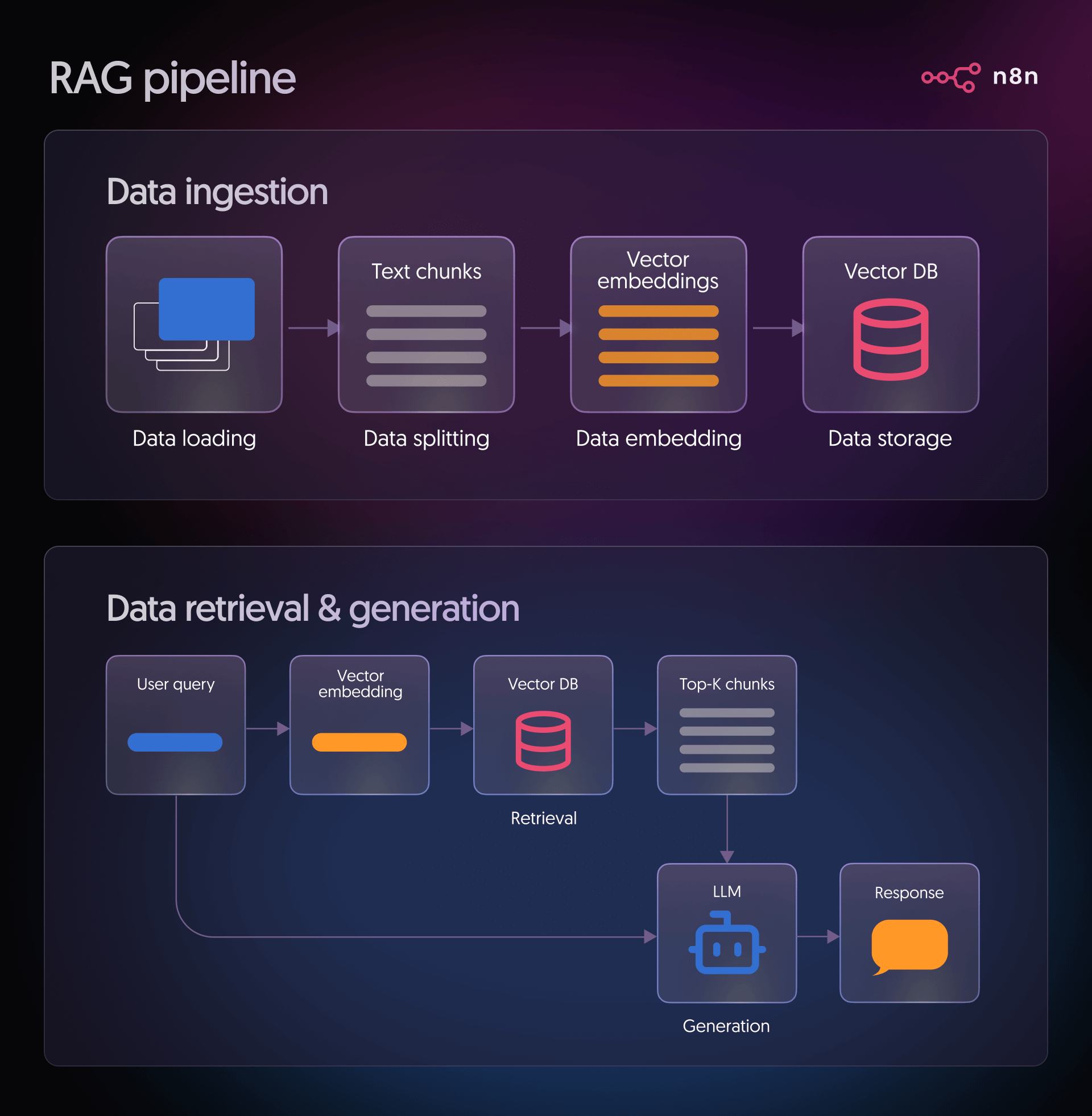
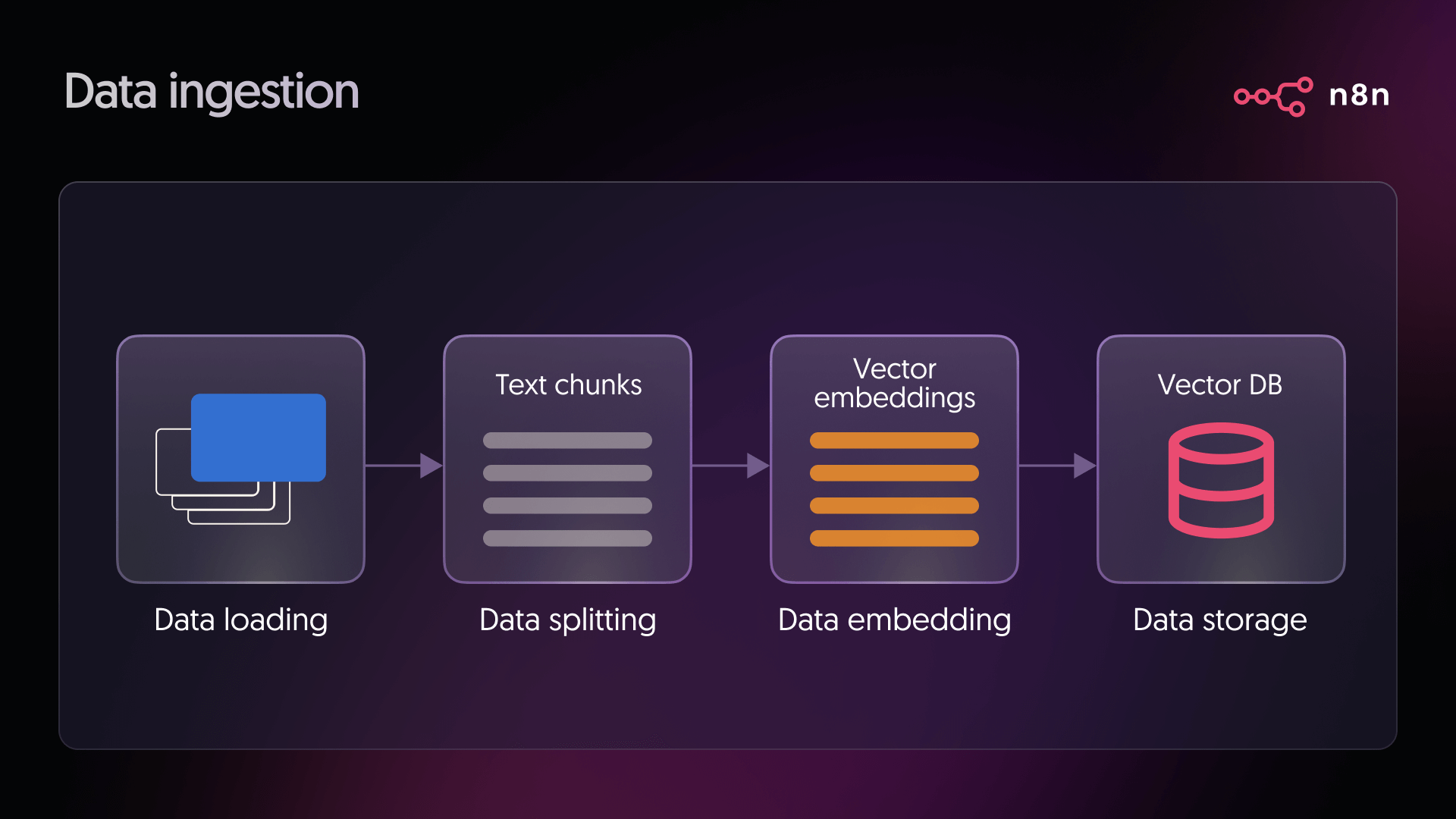
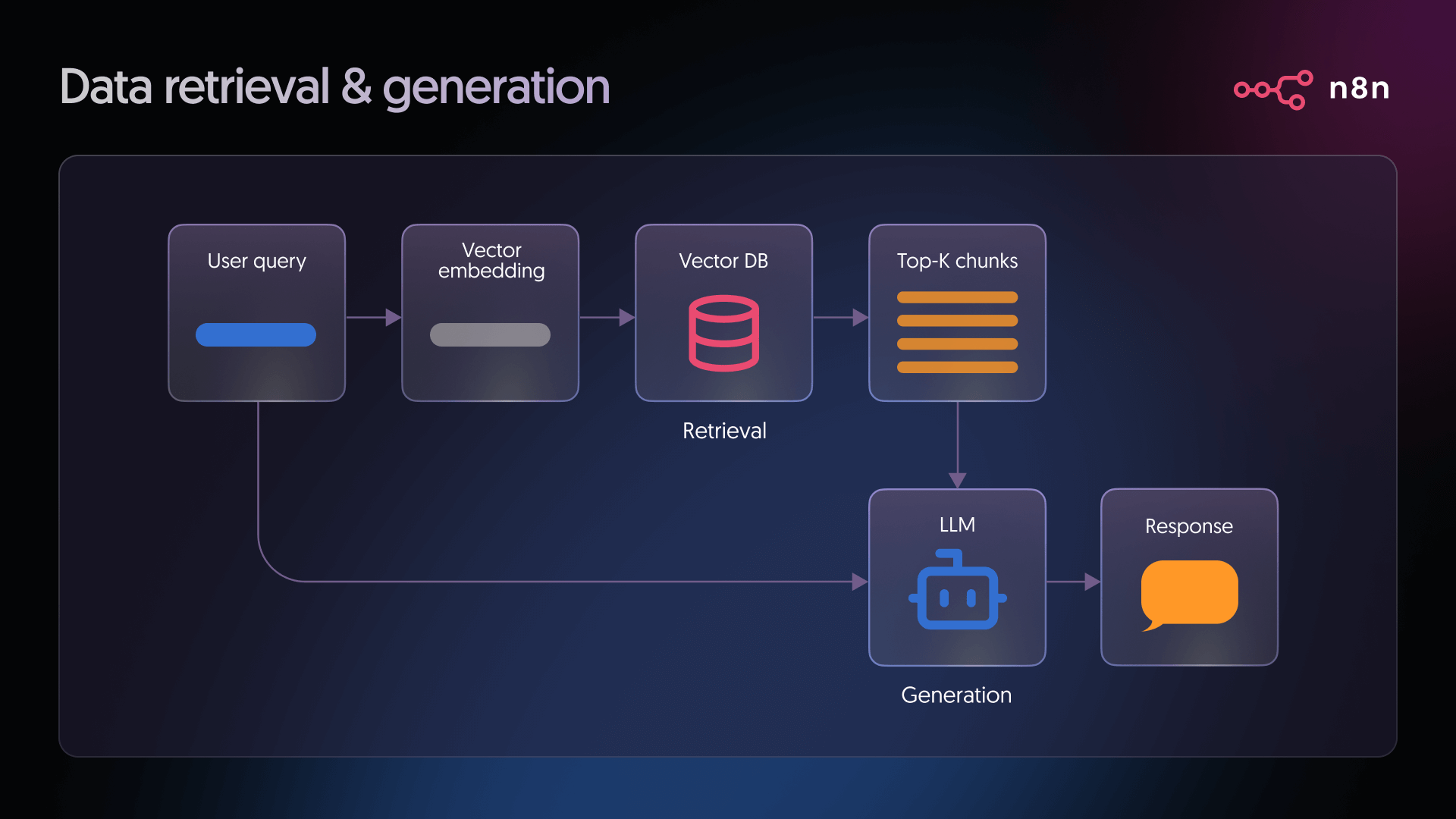
For those interested in the n8n AI capabilities, building a Retrieval-Augmented Generation (RAG) pipeline is a powerful application. Here is the architectural flow:
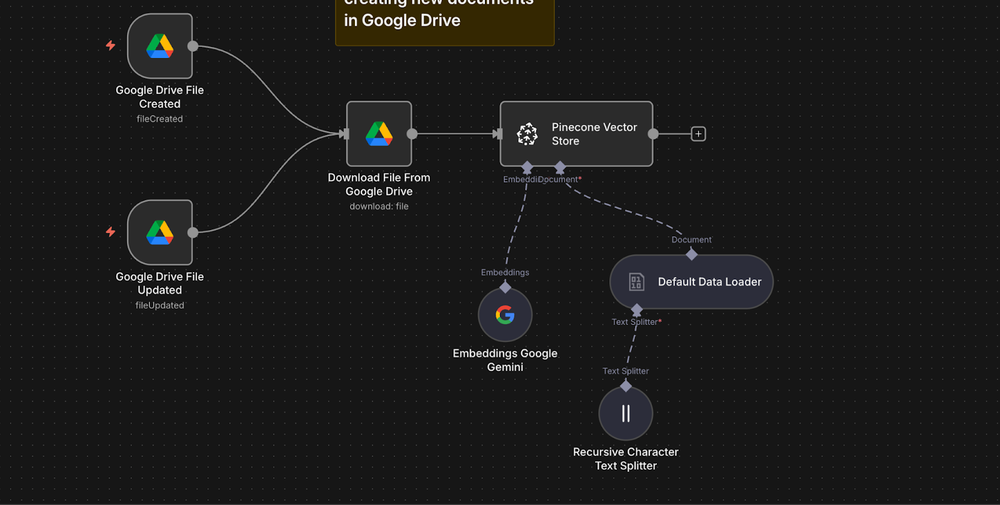
- Ingest: Use a node to fetch documentation (e.g., from a GitHub repo).
- Vectorize: Pass the text through an embedding model (like OpenAI’s text-embedding-3-small).
- Store: Save vectors into a Vector Store (Pinecone or Qdrant) via n8n integration.
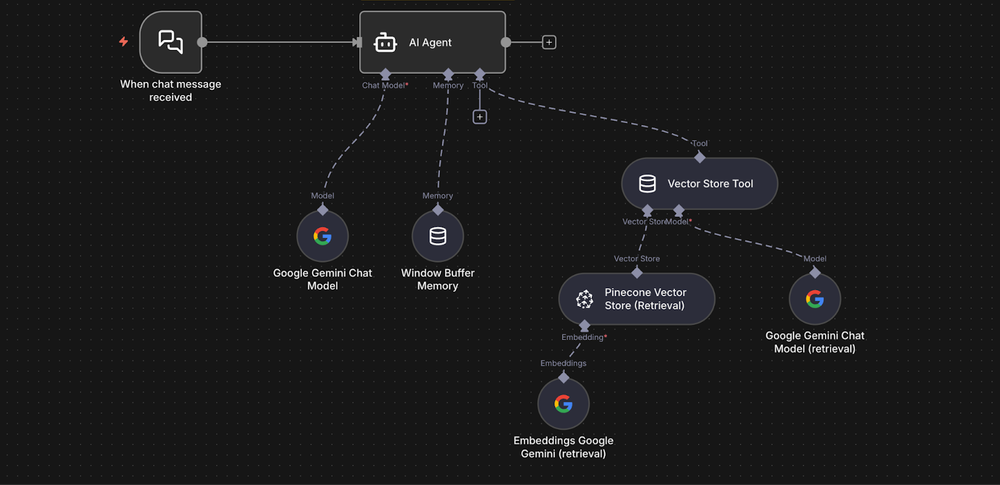
- Retrieve: When a user asks a question via a Chat Trigger, the n8n workflow queries the vector database for context.
- Generate: The LLM generates an accurate answer based on your specific data.
This visual approach to building AI agents democratizes access to advanced Machine Learning concepts without requiring a dedicated Data Science team.
Why “Spaghetti Code” is Obsolete
In the past, connecting a Google Sheet to a PostgreSQL database involved writing a Python script, setting up a cron job, managing API keys in .env files, and monitoring logs. If the API changed, the script broke.
With n8n automation, this process is visual. Error handling is built-in. If a node fails, you can set up an Error Trigger to notify you immediately. This reliability is why financial institutions and tech startups are migrating to n8n. It brings DevOps principles—version control, testing, and monitoring—to the world of automation.
Return to the n8n Blog Homepage
Conclusion
The landscape of software development is shifting towards intelligent orchestration. n8n stands at the forefront of this shift, offering a platform that respects a developer’s need for control while providing the ease of visual coding. Whether you are leveraging the n8n AI agent to build next-gen applications, managing complex data synchronization via n8n workflows, or looking for a cost-effective n8n pricing model, this tool is an essential addition to your tech stack.
Don’t let manual processes slow down your innovation. Join thousands of engineers who are reclaiming their time through intelligent automation.
Found this guide helpful? Share this guide on n8n AI Agents and Automation
Ready to automate your workflow?
Start building powerful AI agents and integrations today.
Create your Free n8n Account NowFrequently Asked Questions
What is n8n and how does it differ from Zapier?
n8n is a “fair-code” workflow automation tool that allows for node-based visual programming. Unlike Zapier, n8n is source-available, meaning you can self-host it, customize the code, and it natively supports running JavaScript and Python for complex data manipulation.
Is n8n free to use?
Yes, the Community Edition of n8n is free forever if you choose to self-host it on your own server or locally using Docker/npm. Paid plans are available for their managed Cloud hosting service or Enterprise features.
How do I use an n8n AI Agent?
You can build n8n AI Agents by dragging and dropping LangChain nodes onto the canvas. These agents can perceive data (via web scrapers or database queries), think using LLMs like GPT-4, and act by executing tasks across your connected apps.
Additional Visual Resources